
AI-powered cloud platform for distribution teams

Cloud-based business management for distributors

Control customer credit, recoveries, payments, expenses, banking, inventory, and daily operations from one clear and reliable system with AI-assisted insights, smart alerts, and secure cloud access.

Trusted by distributors to recover cash, control credit, and close every day accurately.

Recover payments faster, manage outstanding credit, reconcile daily operations, and keep your existing DMS in place.

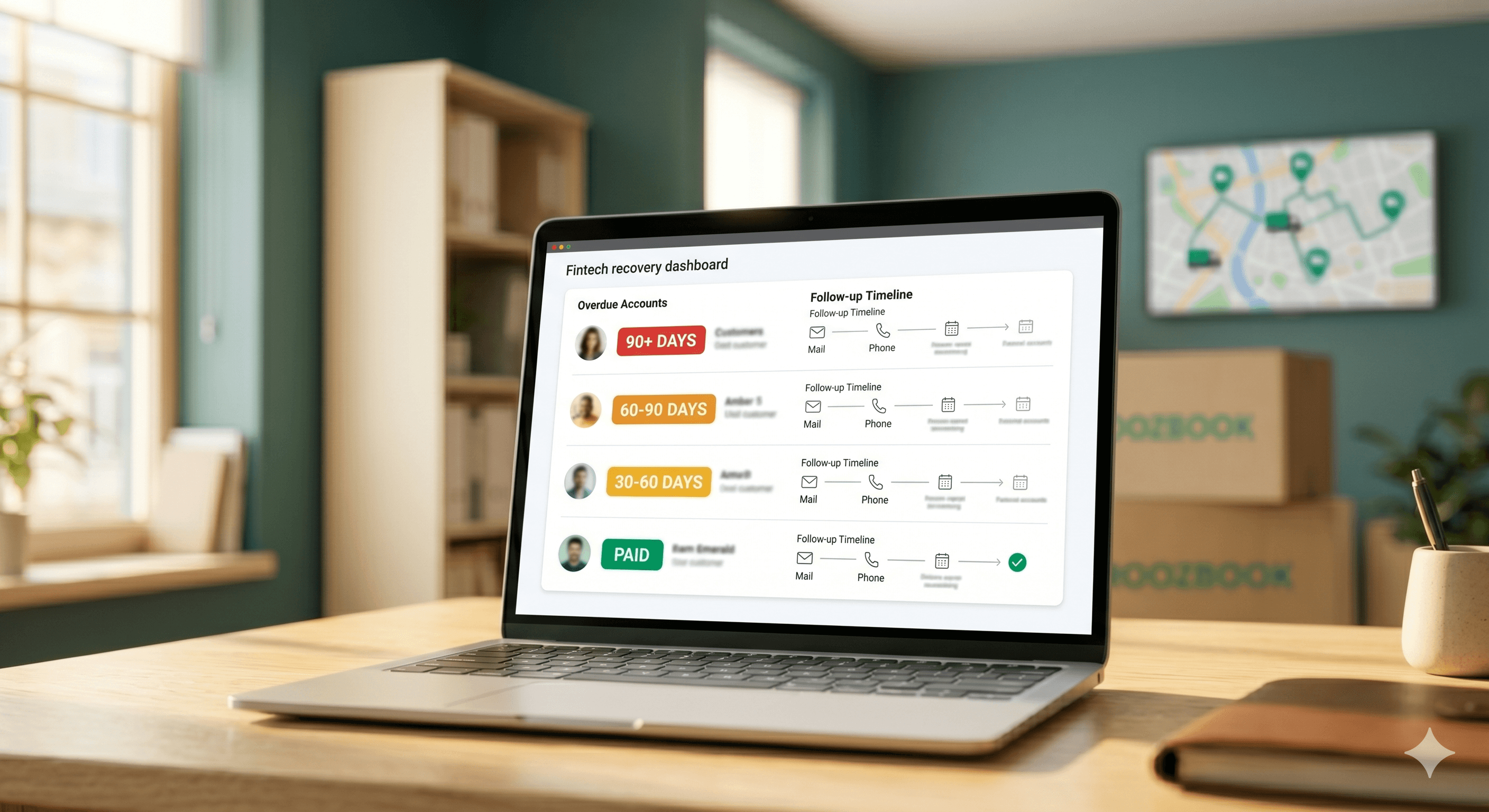
Recover Payments Faster

Prioritize overdue customers, track follow-ups, and keep the recovery team focused on the right dues.

  • Overdue alerts and follow-up history
  • Promised payments tracking
  • Team recovery performance

Control Outstanding Credit

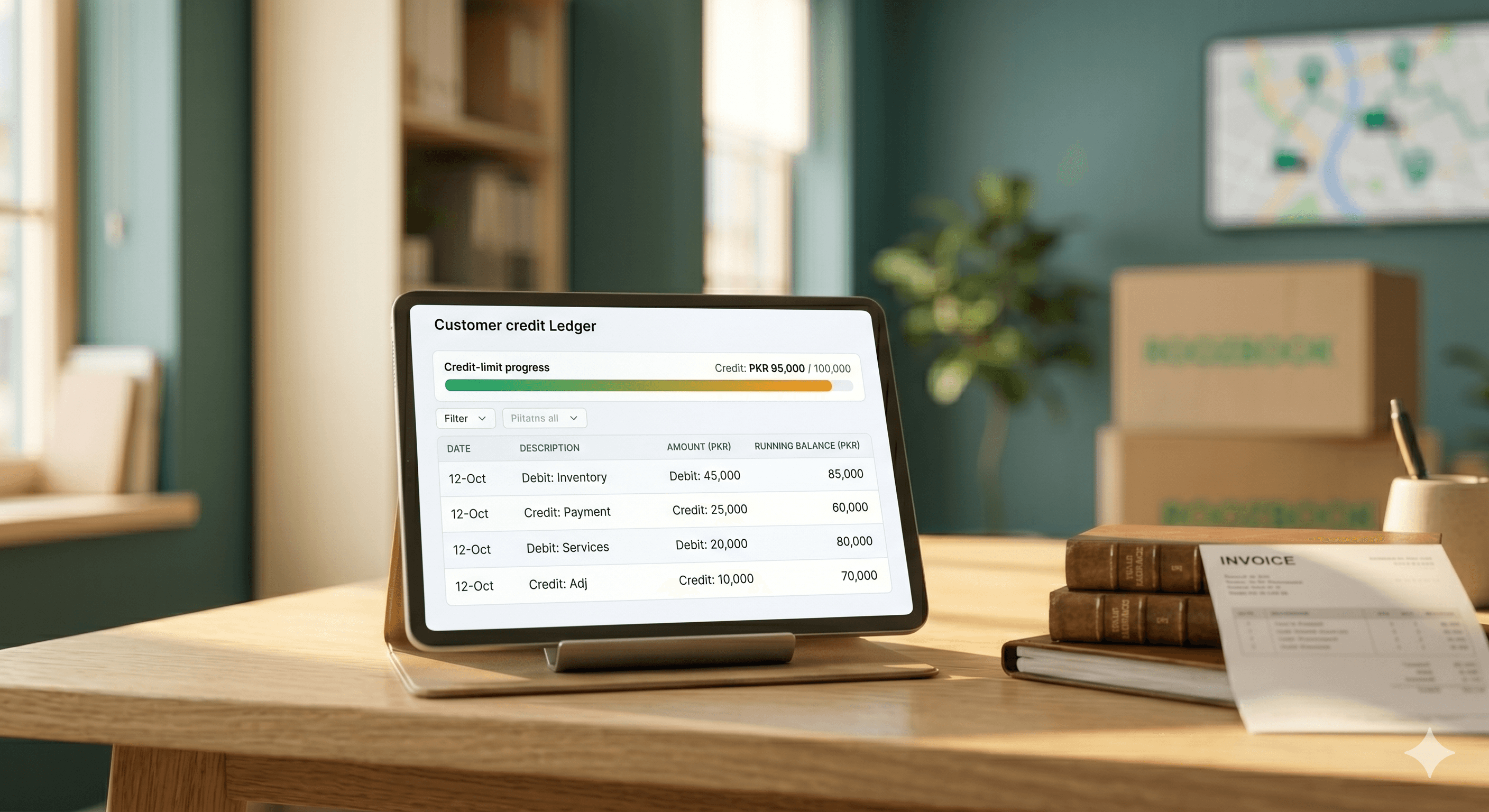
View each customer’s balance, payment history, aging, and credit exposure in one place.

  • Complete customer ledger
  • Credit limit alerts
  • Invoice and payment history

Close Every Day Accurately

Reconcile sales, recoveries, cash, bank deposits, and expenses before the business day is closed.

  • Guided day-end workflow
  • Cash and bank reconciliation
  • Daily variance alerts

Work With Your Existing DMS

Import customers, invoices, and recoveries without replacing your current distribution or invoicing software.

  • Bulk import from Excel or DMS
  • Duplicate detection
  • Data validation checks

Built for distributors and their cash-flow challenges.

RoozBook is designed around customer credit, recoveries, route teams, bank deposits, expenses, and daily closing—not generic bookkeeping alone.

Built for Distributors

Designed around credit control, recoveries, route staff, bank deposits, and daily closing.

Works With Your DMS

Receive data from existing invoicing or distribution systems without replacing the tools you already use.

Focused on Recovery & Cash Flow

Aging alerts, follow-up tracking, invoice settlement, and day-end reconciliation that turn outstanding balances into collected cash.

Localized for Everyday Business

Built for local business practices with PKR-based reporting, familiar terminology, and future Urdu-friendly workflows.

Everything distributors need to control credit, recovery, routes, and cash.

Start with the essentials, then view the complete RoozBook feature set built for daily distribution work.

Customer Credit & Ledger

See every customer balance in one place. Track every customer's credits, debits, invoices, and payments in one running ledger, so no outstanding balance is missed.

  • Complete customer ledger and transaction history
  • Credit limits with threshold alerts
  • Payment history and outstanding balance tracking

Smart Recovery & Aging

Chase the right dues at the right time. Group outstanding balances by age, identify overdue customers, and track recovery activity before delayed payments affect cash flow.

  • 10-day, 20-day, and 30+ day aging buckets
  • Overdue customer and promised-payment alerts
  • Recovery follow-up history and staff tracking

Payments & Invoice Settlement

Match every payment to the correct invoice. Record customer recoveries and supplier payments, allocate them invoice by invoice, and keep dues accurate in real time.

  • Cash, bank, and digital payment recording
  • Invoice-wise or oldest-first settlement
  • Receipts and payment vouchers

Day-End Closing

Close today and start tomorrow with accurate books. Reconcile sales, recoveries, expenses, cash, and bank deposits before locking the day.

  • Guided day-end closing workflow
  • Cash, bank, expense, and recovery reconciliation
  • Day-end summary with variance alerts

DMS, Invoice & Data Import

Keep your existing software and eliminate double work. Import customers, invoices, recoveries, and related records from DMS or Excel without re-entering data manually.

  • Bulk import of customers, invoices, and recoveries
  • Excel templates and DMS-compatible imports
  • Data validation and duplicate detection

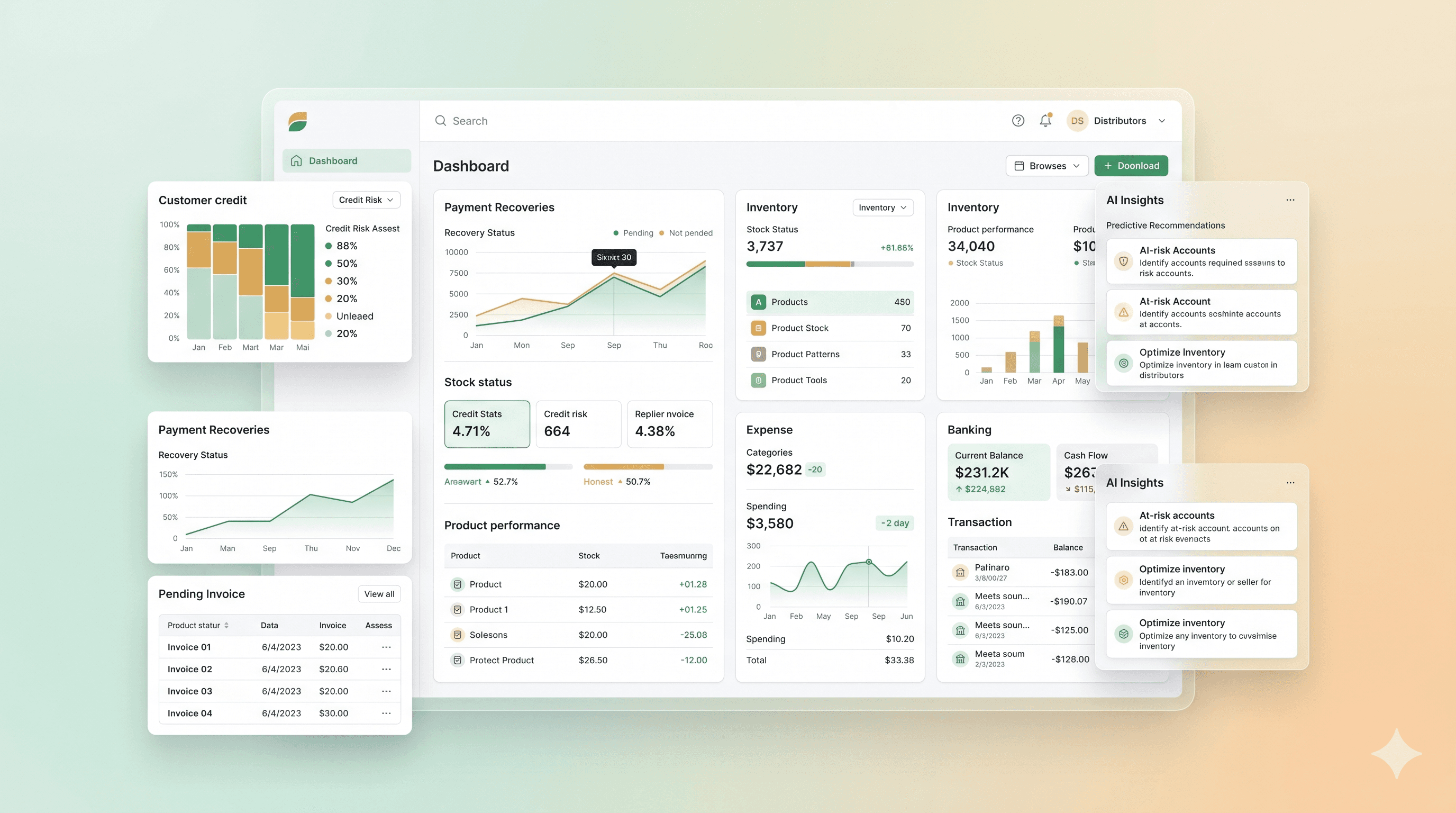
Live Business Dashboard

See the health of your business the moment you log in. Monitor daily sales, collections, outstanding credit, expenses, cash, and bank position.

  • Today's sales, recovery, and expense summary
  • Total outstanding and overdue balances
  • Cash, bank, and collection performance overview

Expense Management

Know where every rupee goes. Record fuel, salaries, freight, utilities, and other operating costs so results reflect the real cost of running the business.

  • Categorized expense recording
  • Recurring expense setup
  • Expense versus income analysis

Banking & Cash Management

Keep cash and bank activity connected to daily operations. Record deposits, transfers, and account movements alongside recoveries and expenses.

  • Multiple bank and cash accounts
  • Bank deposits and internal transfers
  • Basic bank reconciliation and balance tracking

Inventory Management

Know what is in stock and what needs attention. Track stock movement through imports and daily transactions, identify low-stock items, and maintain inventory visibility.

  • Import opening stock and stock movement
  • Real-time stock-in and stock-out tracking
  • Low-stock and reorder alerts

Purchase & Supplier Management

Manage what you owe as clearly as what you are owed. Track purchases, supplier balances, and payments alongside customer sales.

  • Supplier ledger and outstanding payables
  • Purchase and return tracking
  • Supplier payment reminders

Field Staff & Route Management

Keep every salesperson and recovery officer focused on the right customers. Assign customers by route, monitor field activity, and track recovery performance.

  • Route-wise customer assignment
  • Recovery targets and staff performance
  • Daily visits and collection tracking

Reports & Business Insights

Turn daily activity into better decisions. Review sales, recoveries, outstanding credit, customer trends, product movement, and operating performance.

  • Sales, recovery, and aging reports
  • Customer, product, route, and staff analysis
  • Export to PDF and Excel

WhatsApp and Email

Reach customers through the channels they already use. Send invoices, receipts, statements, and payment reminders directly.

  • Invoice, receipt, and statement sharing
  • Automated recovery reminders
  • Bulk and customer-specific messaging

Team & Role Management

Give each team member the access they need and nothing more. Add staff with role-based permissions and maintain a complete activity history.

  • Role-based permissions
  • Staff and user management
  • Activity logs and audit trail

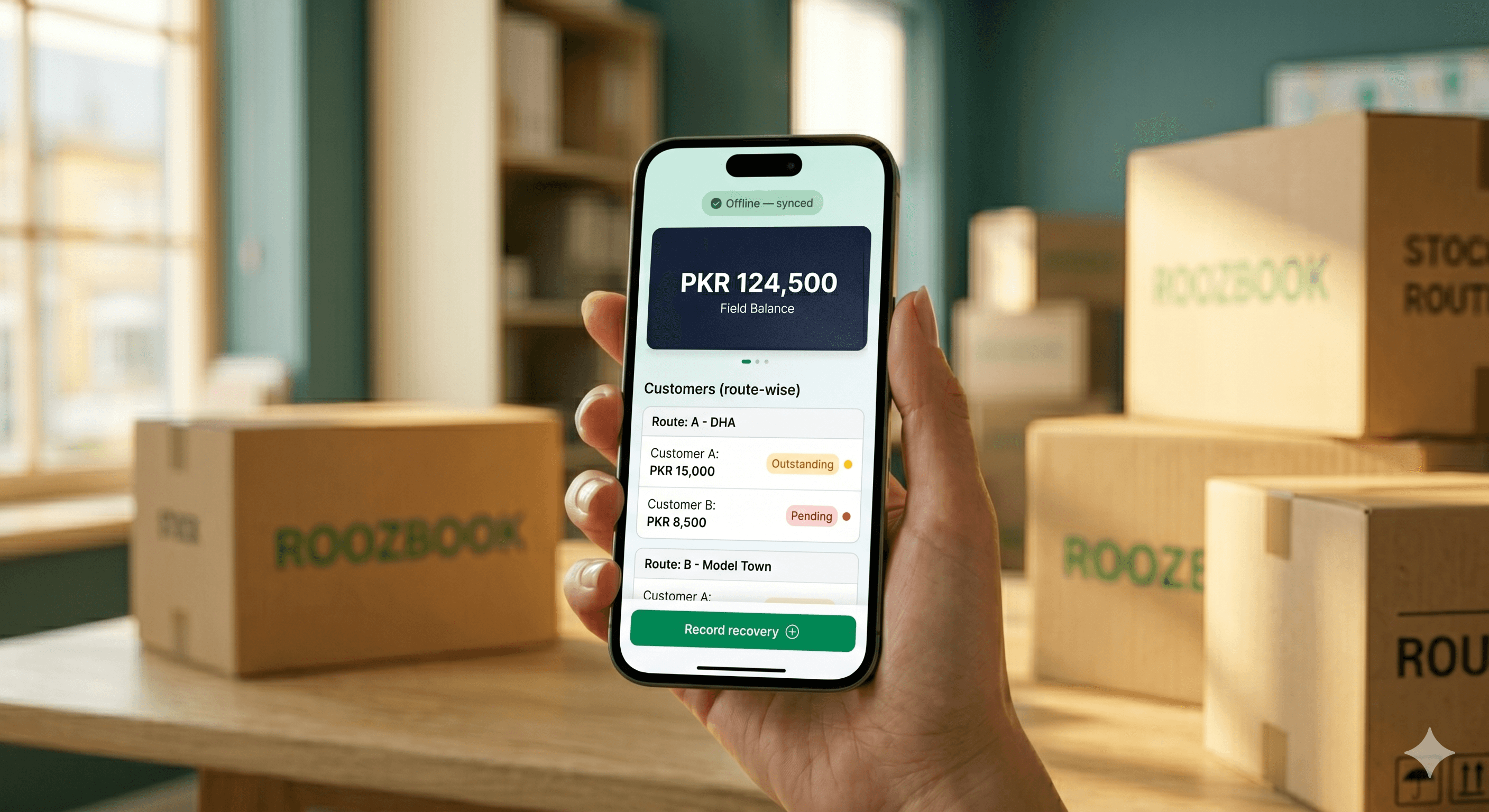
Mobile App

Keep your field team connected on every route. Give field staff mobile access to customers, balances, invoices, and recovery tools.

  • Route-wise customers and outstanding balances
  • Recovery entry and digital receipts
  • Offline access with automatic synchronization

Secure, Reliable & Always Backed Up

Protect the business information you depend on every day with secure access controls, encrypted communication, tenant-level data separation, and automatic backups.

  • Encryption in transit and at rest
  • Automatic backups and recovery protection
  • Role-based access, audit logs, and secure cloud hosting

Setup in 3 Easy Steps

Setting up RoozBook takes less than 5 minutes. Start managing your business like a pro today.

1

Create Account

Share your business details and route count so the right plan can be configured for your team.

2

Add Your Data

Import your existing customers, products, and credit data. Or start fresh — it's up to you.

3

Start Managing

Use the powerful dashboard to track credits, manage inventory, and grow your business.

Rooz Book Pricing Packages

Pricing model: per route, per month (PKR). A distributor's bill = plan price x number of routes.

Starter
Run the daily operation
PKR 2,500/ route
  • Routes max ≤ 5 hard cap
  • 40 active clients /rout
  • 1,000 invoices entries/imported
  • 1,500 recovery entries/imported
  • 12 months data history / retention
Contact Us
Custom
Tailored for scale
Custom
  • Unlimited volume-priced routes
  • Custom limits and modules
  • Mobile app included
  • WhatsApp / SMS automation included
  • Dedicated + SLA support
Contact Us
View all pricing details

Transaction limits below are per route per month, so they scale automatically as routes (and revenue) grow.

Recommendation: treat the Starter volume caps as soft - warn at 80-100% and allow a small overage rather than hard-blocking, so a distributor's operations never stop mid-month. Use feature access as the real upgrade driver.

Monthly transaction limits (per route)

Limit Starter Enterprise Custom
Routes (max) ≤ 5 (hard cap) Unlimited Unlimited (volume-priced)
Active clients /rout 40 70 Custom
Invoices (entries/imported) 1,000 Unlimited Custom
Recovery (entries/imported) 1,500 Unlimited Custom
Voucher / Ledger transactions 3,000 Unlimited Custom
Products / SKUs 50 Unlimited Custom
Bank accounts 1 Unlimited Custom
Staff 10 Unlimited (fair use) Custom
Mobile app (Mobi Rooz) - (add-on) - (add-on) Custom
WhatsApp / SMS reminders - (add-on) - (add-on) Custom
Data history / retention 12 months Unlimited Unlimited

Feature access

Feature Starter Enterprise Custom
Credit Book (customer ledger) Yes Yes Yes
Invoice & data import Yes Yes Yes
Recovery & data import Yes Yes Yes
Bills & payment management Yes Yes Yes
Voucher transactions Yes Yes Yes
Day-end closing Yes Yes Yes
Inventory Yes Yes Yes
Mobile app (staff + client) - - Yes
Standard reports Yes Yes Yes
Aging (buckets, auto reminders) - Yes Yes
Bank Management (cheque tracking) - Yes Yes
Profit & Loss - Yes Yes
Analytics & advanced reports - Yes Yes
Purchase & supplier management - Yes Yes
Role-based permissions & audit logs Basic Full Full
WhatsApp / SMS automation Add-on Add-on Yes
Mobile app (MobiRooz) Add-on Add-on Yes
API access / integrations - Yes Yes
Priority support - Yes Dedicated + SLA
Custom modules, white-label, integrations - - Yes
Dedicated onboarding & training - Standard Tailored

Route cap & the repricing cliff

The route cap is a hard limit (unlike the soft transaction caps) - adding a route is a billing/structural event, so blocking "create route #6 on Starter -> upgrade" is appropriate and won't disrupt daily work.

  • 5 routes Starter = 5 x 2,500 = PKR 12,500 / month
  • 6 routes Enterprise = 6 x 4,000 = PKR 24,000 / month (one route approximately doubles the bill)

Mitigate the cliff with a warm "you've outgrown Starter" upgrade flow, a short transition discount, or Custom volume pricing for large route counts.

Upgrade path

  • In-app upgrade with proration - keep all data, unlock features and lift limits instantly.
  • Nudge to upgrade when a route hits ~80% of a Starter limit, or tries to open a locked feature.
  • Custom is sales-assisted for many routes or bespoke limits/modules.

Why Enterprise is the obvious choice

  • Unlimited core volume for clients, invoices, recovery, and vouchers.
  • P&L + Analytics turn raw data into decisions.
  • Cheque management solves a genuine distributor pain.
  • Automated recovery with WhatsApp/SMS reminders + aging.
  • Unlimited staff logins, longer history, and Excel exports.

Implementation notes

  • Map each row to a feature or limit in the entitlement model.
  • max_routes is a hard limit; transaction caps should be soft.
  • Keep numbers tunable and consider an annual plan with 2 months free.

Talk to RoozBook about your routes, limits, and rollout.

Share your route count, team size, and reporting needs. We will help you choose Starter, Enterprise, or a Custom plan that fits your operation.

Contact RoozBook

Get pricing guidance, onboarding details, and a rollout plan for your distribution business.

AI recovery intelligence

Prioritize overdue customers, flag risky accounts, and suggest follow-up actions based on aging, payment history, and route performance.

AI-based cloud insights

Secure cloud dashboards surface route trends, cash-flow pressure, stock movement, and unusual activity before it becomes a monthly surprise.

Smart automation

Use automated reminders, exception alerts, and decision-ready reports to keep teams focused on collection, closing, and growth.

Ready to price your distribution routes?

Tell us how many routes you run today and which features you need. RoozBook will guide you to the right package and rollout path.

Contact Us

Rooz AI Assistant

Routes, pricing, recovery, and cloud setup

Hi, I can help you understand RoozBook pricing, route limits, recovery alerts, and AI-based cloud features.